
网络编程
1. 概述
地球村:也译为世界村(global village),对地球的一种比喻说法。现代科技的迅速发展,缩小了地球上的时空距离,国际交往日益频繁便利,因而整个地球就如同是茫茫宇宙中的一个小村落。
TCP:打电话 —— 连接 —— 接了 —— 通话
UDP:发短信 —— 发送了就完事了 —— 不管你有没有接收到
计算机网络:
- 计算机网络是指将 地理位置不同 的具有独立功能的 多台计算机及其外部设备,通过通信线路和通信设备连接起来 ,在网络操作系统,网络管理软件及 网络通信协议 的管理和协调下,实现 资源共享 和信息传递的计算机系统。
网络编程的目的:
- 传播交流信息【数据交换 / 通信】
想要达到这个效果需要什么:
- 如何准确的定位网络上的一台主机 172.20.10.3:端口号,定位到这个计算机上的某个资源;
- 找到了这个主机,如何传输数据呢?
java 做 web 开发 :网页编程 【B/S架构,所有东西是通过浏览器访问的】
当前课程 :网络编程【TCP/IP 协议,C/S架构,通过客户端去访问】
2. 网络通信的要素
如何实现网络的通信?
通信双方地址
- ip
- 端口号
规则:网络通信的协议【本次课程针对 传输层 进行学习】
http ftp smtp tcp udp ……
TCP / IP 参考模型
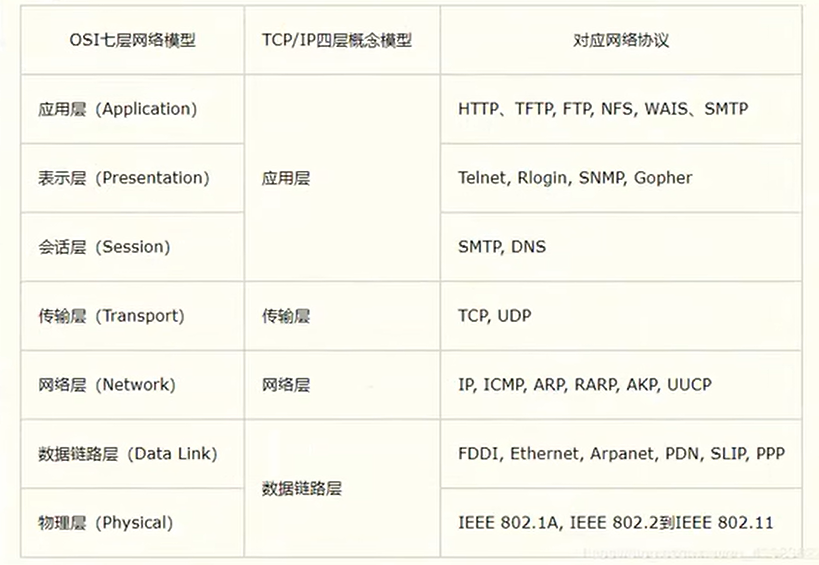
小结:
- 网络编程中有两个主要的问题
- 如何准确的定位到网络上的一台或多台主机
- 找到主机之后如何进行通信
- 网络编程中的要素
- IP 和端口号【学习关于IP和端口号的类】
- 网络通信协议【学习关于TCP和UDP的类】
- Java 万物皆对象
3. IP
ip 地址:InetAdress
- 唯一定位一台网络上的计算机
- 127.0.0.1 :本机 localhost
- ip 地址的分类
- ipv4 / ipv6
- ipv4:4个字节组成,0 ~ 255 。如:127.0.0.1
- ipv6:128位,8个无符号整数。如:2409:8929:232:128b:9886:2567:cbff:20dc
- 公网(互联网)-- 私网(局域网)
- ABCD类地址 【0 ~ 255 折半,越来越少】
- 192.168.xx.xx 专门给组织内部使用的
- 域名:记忆IP问题 www.baidu.com
- ipv4 / ipv6
java
/**
 * 获取 IP
 */
public class _01_IP {
    public static void main(String[] args) {
        try {
            // 查询本机 ip地址
            InetAddress ip1 = InetAddress.getByName("127.0.0.1");
            System.out.println(ip1);
            InetAddress ip2 = InetAddress.getByName("localhost");
            System.out.println(ip2);
            InetAddress ip3 = InetAddress.getLocalHost();
            System.out.println(ip3);

            // 查询网站 ip地址
            InetAddress ip4 = InetAddress.getByName("www.baidu.com");
            System.out.println(ip4);

            //常用方法
            //System.out.println(ip4.getAddress());//byte 获取地址的字节
            System.out.println(ip4.getCanonicalHostName());//获取规范的地址名称
            System.out.println(ip4.getHostAddress());//ip
            System.out.println(ip4.getHostName());//域名 或者 自己电脑的电脑名称
        } catch (UnknownHostException e) {
            throw new RuntimeException(e);
        }
    }
}
4. 端口
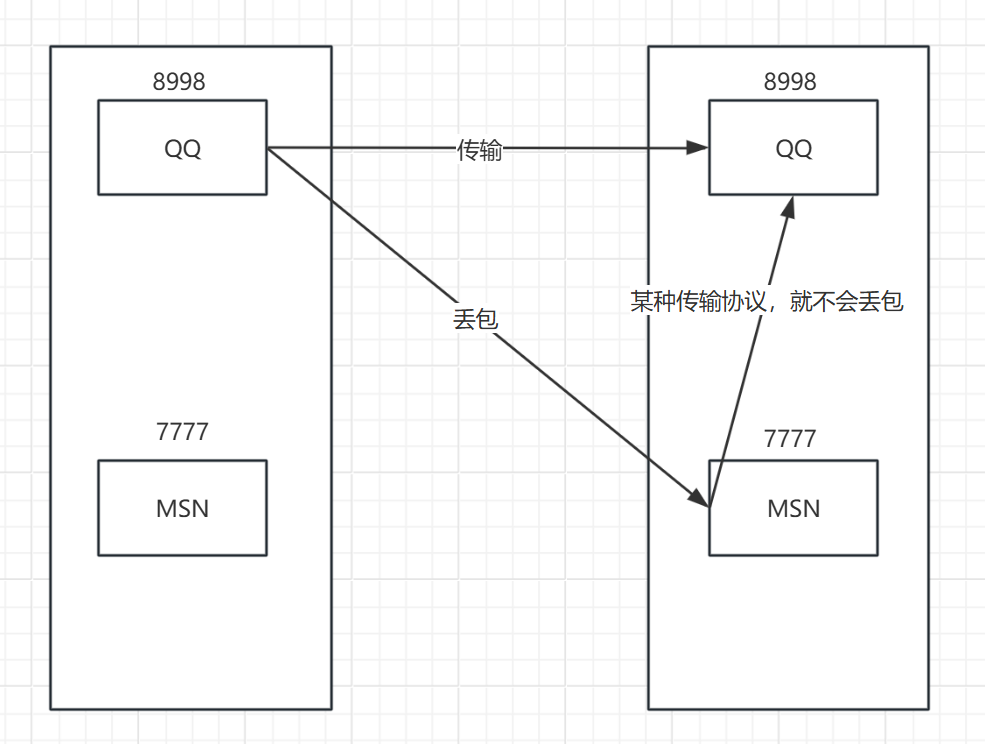
端口表示计算机上的一个程序的进程;
- 不用的进程有不同的端口号!用来区分软件!
- 被规定 0 ~ 65536 个端口号
- TCP,UDP:每一个都有 65536 个端口【单个协议下端口号不能冲突】
端口分类:
公有端口 0 ~ 1023 【不要使用】
- HTTP:80 端口
- HTTPS:443 端口
- FTP:21 端口 【文件传输协议】
- Telent:23 端口
程序注册端口:1014 ~ 49151,分配给用户或者程序的
- Tomcat:8080
- MySQL:3306
- Oracle:1521
动态端口、私有端口:49152 ~ 65536
bashnetstat -ano #查看所有的端口 netstat -ano|findstr "8080" #查看指定的端口 tasklist|findstr "26400" #查看指定端口的进程 ctrl + shift + esc #快捷键:打开任务管理器端口映射 —— 要么丢包,要么接收
java
/**
 * InetSocketAddress 端口
 */
public class _02_Port {
    public static void main(String[] args) {
        InetSocketAddress socketAddress = new InetSocketAddress("127.0.0.1", 8080);
        System.out.println(socketAddress);// 127.0.0.1:8080

        InetSocketAddress socketAddress2 = new InetSocketAddress("localhost", 8080);
        System.out.println(socketAddress2);// localhost/127.0.0.1:8080

        System.out.println(socketAddress.getAddress());// 地址:/127.0.0.1
        System.out.println(socketAddress.getHostName());// 地址名称:www.orla.com 【配置的C:\Windows\System32\drivers\etc\hosts】
        System.out.println(socketAddress.getPort());// 端口:8080
    }
}
5. 通信协议
协议:约定,就好比我们现在说的普通话,能够交流沟通。
5.1 网络通信协议
网络通信协议:速率、传输码率、代码结构、传输控制……
问题:非常的复杂?
大事化小:分层!
- TCP / IP 协议簇【实际上是一组协议】
- TCP:用户传输协议【打电话】
- UDP:用户数据报协议【发短信】
- 出门的协议:
- TCP:用户传输协议
- IP:网络互联协议
5.2 TCP & UDP 对比
TCP :带电话
连接、稳定
三次握手四次握手bash最少需要三次,保证稳定连接! A:你愁啥? B:瞅你咋地? A:干一场啊! A:我要走了! B:你真的要走了吗? B:你真的真的要走了吗? A:我真的要走了!客户端 —— 服务端
传输完成,释放连接,效率低
UDP
- 不连接,不稳定
- 客户端、服务端:没有明确的界限
- 不管有没有准备好,都可以发给你【能不能接收到看命运】
- 举例
- 导弹攻击
- DDOS:洪水攻击!(饱和攻击)
6. TCP
客户端:
- 连接服务器 Socket
- 发送消息
服务器:
- 建立服务的端口 ServerSocket
- 等待客户的连接 accept()
- 接收用户的消息
6.1 发送信息
java
/**
 * TCP:用户传输协议
 *
 * 客户端
 */
public class _03_TcpClient_01 {
    public static void main(String[] args) throws IOException {
        Socket socket = null;
        OutputStream os = null;

        try {
            //1.需要知道服务器地址和端口号
            InetAddress byName = InetAddress.getByName("127.0.0.1");
            int port = 9999;

            //2.创建一个 Socket 连接
            socket = new Socket(byName, port);

            //3.发送消息(IO流)
            os = socket.getOutputStream();
            os.write("hello,正在学习 TCP 协议!".getBytes());

        } catch (IOException e) {
            throw new RuntimeException(e);
        }finally {
            //关闭资源【先开后关】
            //先判断不为空,再关闭
            if(os != null){
                os.close();
            }
            if(socket != null){
                socket.close();
            }
        }
    }
}
java
/**
 * 服务端
 */
public class _03_TcpServer_01 {
    public static void main(String[] args) throws IOException {
        ServerSocket serverSocket = null;
        Socket accept = null;
        InputStream is = null;
        ByteArrayOutputStream baos = null;

        try {
            //1.我需要有一个地址和端口号
            serverSocket = new ServerSocket(9999);

            //循环监听
            while(true) {
                //2.等待客户端连接过来
                accept = serverSocket.accept();

                //3.读取客户端的消息
                is = accept.getInputStream();
                //管道流
                baos = new ByteArrayOutputStream();
                byte[] buffer = new byte[1024];
                int len = 0;
                while ((len = is.read(buffer)) != -1) {
                    baos.write(buffer, 0, len);
                }
                System.out.println(baos.toString());
            }

            /*
            //会乱码
            byte[] buffer = new byte[1024];
            int len;
            while ((len = is.read(buffer)) != -1) {
                String msg = new String(buffer, 0, len);
                System.out.println(msg);
            }
            */

        } catch (IOException e) {
            throw new RuntimeException(e);
        } finally {
            //关闭资源【先开后关】
            //先判断不为空,再关闭
            if (baos != null) {
                baos.close();
            }
            if (is != null) {
                is.close();
            }
            if (accept != null) {
                accept.close();
            }
            if (serverSocket != null) {
                serverSocket.close();
            }
        }
    }
}
6.2 发送文件
java
/**
 * TCP:上传图片
 * 客户端
 *
 * 本质:Socket 通信
 */
public class _03_TcpClient_02 {
    public static void main(String[] args) throws IOException {
        Socket socket = null;
        OutputStream os = null;
        FileInputStream fis = null;
        InputStream is = null;
        ByteArrayOutputStream baos = null;
        try {
            //1.获取与服务端的连接
            socket = new Socket("127.0.0.1", 9999);

            //2.发送信息
            //创建一个文件流,先读进来,再写出去
            os = socket.getOutputStream();
            fis = new FileInputStream(new File("image-20250804102239387.png"));//读【管道流】
            byte[] buffer = new byte[1024];
            int len = 0;
            while ((len = fis.read(buffer)) != -1) {
                os.write(buffer, 0, len);//写
            }
            //通知服务器,这边输出完毕
            socket.shutdownOutput();

            //3.确定服务器接收完毕,才能关闭资源
            is = socket.getInputStream();
            baos = new ByteArrayOutputStream();//管道流
            byte[] buffer2 = new byte[1024];
            int len2 = 0;
            while ((len2 = is.read(buffer2)) != -1) {
                baos.write(buffer2, 0, len2);
            }

            if(baos.toString()!=null && !baos.toString().isEmpty()){
                String[] arrs = baos.toString().split("@");
                if(arrs[0].equals("true")){
                    System.out.println(arrs[1]);
                    baos.close();
                    is.close();
                    fis.close();
                    os.close();
                    socket.close();
                }
            }
        } catch (IOException e) {
            throw new RuntimeException(e);
        } finally {
            if (baos != null) {
                baos.close();
            }
            if (is != null) {
                is.close();
            }
            if (fis != null) {
                fis.close();
            }
            if (os != null) {
                os.close();
            }
            if (socket != null) {
                socket.close();
            }
        }
    }
}
java
/**
 * 服务端
 */
public class _03_TcpServer_02 {
    public static void main(String[] args) throws IOException {
        ServerSocket socket =null;
        Socket accept = null;
        InputStream is = null;
        FileOutputStream fileOutputStream = null;
        OutputStream os = null;
        try {
            //1.提供一个服务器ip和端口
            socket = new ServerSocket(9999);

            //2.监听客户端的连接【阻塞式监听,会一直以等待客户端连接,与Scanner相似】
            accept = socket.accept();

            //3.接收信息
            is = accept.getInputStream();
            fileOutputStream = new FileOutputStream("portMapping.png");
            byte[] buffer = new byte[1024];
            int len = 0;
            while((len = is.read(buffer)) != -1) {
                fileOutputStream.write(buffer, 0, len);
            }

            //4.告诉客户端,文件已收到
            os = accept.getOutputStream();
            os.write("true@文件已收到".getBytes());

        } catch (IOException e) {
            throw new RuntimeException(e);
        } finally {
            //关闭资源
            if (os != null) {
                os.close();
            }
            if (fileOutputStream != null) {
                fileOutputStream.close();
            }
            if (is != null) {
                is.close();
            }
            if (accept != null) {
                accept.close();
            }
            if (socket != null) {
                socket.close();
            }
        }
    }
}
7. Tomcat
- C/S端:客户端/服务器端
- B/S端:浏览器端/服务器端
服务端
- 自定义 S
- Tomcat 服务器 S 【Java后台开发】
客户端
- 自定义 C
- 浏览器 B
.bat window 的可执行文件
.sh Linux 的可执行文件
8. UDP
- 发短信:不用连接,但是需要知道对方的地址!
- DatagramPacket 数据报包
- DatagramSocket 用于发送和接收数据报数据包的套接字
8.1 单点发送,单点接收,控制台 System.in 键入信息
java
/**
 * UDP 聊天室
 *
 * 控制台输入聊天内容,发送给 ClientB
 */
public class _04_UdpClientA_02 {
    public static void main(String[] args) throws Exception {
        DatagramSocket socket = null;
        BufferedReader reader = null;
        try {
            //1.建立 socket 连接
            socket = new DatagramSocket(9090);

            //2.数据包准备
            InetAddress localhost = InetAddress.getByName("localhost");
            int port = 9092;
            reader = new BufferedReader(new InputStreamReader(System.in));

            String msg = null;
            while((msg=reader.readLine())!=null){
                DatagramPacket packet = new DatagramPacket(msg.getBytes(),0, msg.getBytes().length, localhost, port);
                //3.发送
                socket.send(packet);

                if("exit".equals(msg)){
                    System.out.println("---聊天结束---");
                    return;
                }
            }
        } catch (Exception e) {
            throw new RuntimeException(e);
        }finally{
            //5.关闭资源
            if (reader != null) {
                reader.close();
            }
            if (socket != null) {
                socket.close();
            }
        }
    }
}
java
/**
 * UDP 聊天室
 *
 * 接收 ClientA 信息
 */
public class _04_UdpClientB_02 {
    public static void main(String[] args) throws IOException {

        DatagramSocket socket = null;
        try {
            //1.建立 Socket 连接
            socket = new DatagramSocket(9092);

            //2.接收
            while (true) {
                byte[] buf = new byte[1024];
                DatagramPacket packet = new DatagramPacket(buf, buf.length);
                socket.receive(packet);
                String receiveMsg = new String(packet.getData(),0,packet.getLength());
                System.out.println(receiveMsg);

                if(receiveMsg.equals("exit")){
                    socket.close();
                    break;
                }
            }
        } catch (Exception e) {
            throw new RuntimeException(e);
        } finally {
            //5.关闭资源
            if (socket != null) {
                socket.close();
            }
        }
    }
}
8.2 模拟聊天室
要点:多线程
java
/**
 * 发送端
 */
public class _05_Send implements Runnable {
    private DatagramSocket socket = null;
    private BufferedReader reader = null;
    private InetAddress toInetAddress = null;
    private int toIp;

    public _05_Send(int myIp, String toAddress, int toIp) throws Exception {
        this.toIp = toIp;

        //1.创建 socket 连接
        socket = new DatagramSocket(myIp);
        //发送方地址
        toInetAddress = InetAddress.getByName(toAddress);
    }

    @Override
    public void run() {
        try {
            while(true) {
                //2.准备数据包
                reader = new BufferedReader(new InputStreamReader(System.in));
                String msg;
                while ((msg = reader.readLine()) != null) {
                    DatagramPacket packet = new DatagramPacket(msg.getBytes(),0,msg.getBytes().length,toInetAddress,toIp);
                    //3.发送数据包
                    socket.send(packet);

                    if("exit".equals(msg)){
                        System.out.println("---聊天结束---");
                        return;
                    }
                }
            }
        } catch (IOException e) {
            throw new RuntimeException(e);
        } finally {
            //4.关闭资源
            try {
                reader.close();
            } catch (IOException e) {
                throw new RuntimeException(e);
            }
            socket.close();
        }
    }
}
java
/**
 * 接收端
 */
public class _05_Receive implements Runnable {
    private DatagramSocket socket = null;

    public _05_Receive(int myIp) throws Exception {
        //1.创建 socket 连接
        socket = new DatagramSocket(myIp);
    }

    @Override
    public void run() {
        try {
            while (true) {
                //2.接收数据包
                byte[] buffer = new byte[1024];
                DatagramPacket packet = new DatagramPacket(buffer, 0, buffer.length);
                socket.receive(packet);

                //打印输出
                String receiveMsg = new String(packet.getData(), 0, packet.getLength());
                System.out.println(receiveMsg);

                if(receiveMsg.equals("exit")){
                    socket.close();
                    break;
                }
            }
        } catch (IOException e) {
            throw new RuntimeException(e);
        } finally {
            //3.关闭资源
            socket.close();
        }
    }
}
java
/**
 * 聊天室:客户端 A
 */
public class _05_ClientA {
    public static void main(String[] args) throws Exception {
        //发送端
        _05_Send send = new _05_Send(9090, "localhost", 9991);
        //接收端
        _05_Receive receive = new _05_Receive(9993);

        //开启线程
        new Thread(send).start();
        new Thread(receive).start();

    }
}
java
/**
 * 聊天室:客户端 B
 */
public class _05_ClientB {
    public static void main(String[] args) throws Exception {
        //发送端
        _05_Send send = new _05_Send(9992, "localhost", 9993);
        //接收端
        _05_Receive receive = new _05_Receive(9991);

        //开启线程
        new Thread(send).start();
        new Thread(receive).start();
    }
}
9. URL
- url :统一资源定位符【定位资源的,定位互联网上的某一个资源】
- DNS:域名解析 如:把 www.baidu.com 解析成 xxx.xxx.xxx.xxx
bash
协议://域名(ip):端口号/项目名/资源 # url 由5部分组成,可以少不能多9.1 了解 URL
java
/**
 * Url
 */
public class _06_Url {
    public static void main(String[] args) {
        try {
            URL url = new URL("https://localhost:8080/xxl-job-admin/jobinfo?jobGroup=3");

            System.out.println(url.getProtocol());//获取 协议名
            System.out.println(url.getHost());//获取 主机IP
            System.out.println(url.getPort());//获取 端口号
            System.out.println(url.getPath());//获取 文件地址
            System.out.println(url.getFile());//获取 文件全路径
            System.out.println(url.getQuery());//获取 参数

        } catch (Exception e) {
            throw new RuntimeException(e);
        }
    }
}
9.2 下载网上 URL 资源
java
/**
 * 下载网上 URL 资源
 */
public class _07_UrlDownload {
    public static void main(String[] args) throws IOException {

        _07_UrlDownload down = new _07_UrlDownload();

        String urlJsp = "http://localhost:8080/oral/myFile.jsp";
        String fileJsp = "D:\\02_work\\softWare_work\\JetBrains\\IntelliJ IDEA 2024.2.0.2\\workspace\\studyFollowKuang\\01-JavaBase\\04_network_program\\src\\main\\resources\\myFile.jsp";

        String urlGif = "https://i0.hdslb.com/bfs/static/jinkela/playlist-video/asserts/playing.gif";
        String fileGif = "D:\\02_work\\softWare_work\\JetBrains\\IntelliJ IDEA 2024.2.0.2\\workspace\\studyFollowKuang\\01-JavaBase\\04_network_program\\src\\main\\resources\\playing.gif";

        String urlMp4 = "https://video.da.mgtv.com/new_video/2025/07/14/4419/94E2A3BAC00CBE2BD58F22048064BB84_20250714_1_1_1212.mp4";
        String fileMp4 = "D:\\02_work\\softWare_work\\JetBrains\\IntelliJ IDEA 2024.2.0.2\\workspace\\studyFollowKuang\\01-JavaBase\\04_network_program\\src\\main\\resources\\video.mp4";

        down.urlDown(urlJsp,fileJsp);//下载 jsp 文件
        down.urlDown(urlGif,fileGif);//下载 gif 文件
        down.urlDown(urlMp4,fileMp4);//下载 mp4 文件

    }

    public void urlDown(String urlStr,String file) throws IOException {
        //1.获得下载地址 URL
        URL url = new URL(urlStr);

        //2.连接到这个资源 HTTP
        HttpURLConnection urlConnection = (HttpURLConnection) url.openConnection();

        //3.获得 流
        InputStream is = urlConnection.getInputStream();

        //4.创建 文件流
        FileOutputStream fos = new FileOutputStream(file);

        //5.开始下载
        byte[] buffer = new byte[1024];
        int len = 0;
        while ((len = is.read(buffer)) != -1) {
            fos.write(buffer, 0, len);
        }

        //6.关闭资源
        fos.close();
        is.close();
        urlConnection.disconnect();
    }
}